
Before you start
Use Rollnook 1.2 or later. Start with a personal set containing five loose dice. Selection belongs to the set and also works with its bags.
What you will make
Players choose before the action, with a clear count and a rule for when chosen pieces become available again.
- Choose 2 of 5
- Roll those 2
- All 5 return next turn
Open How to play → Before playing
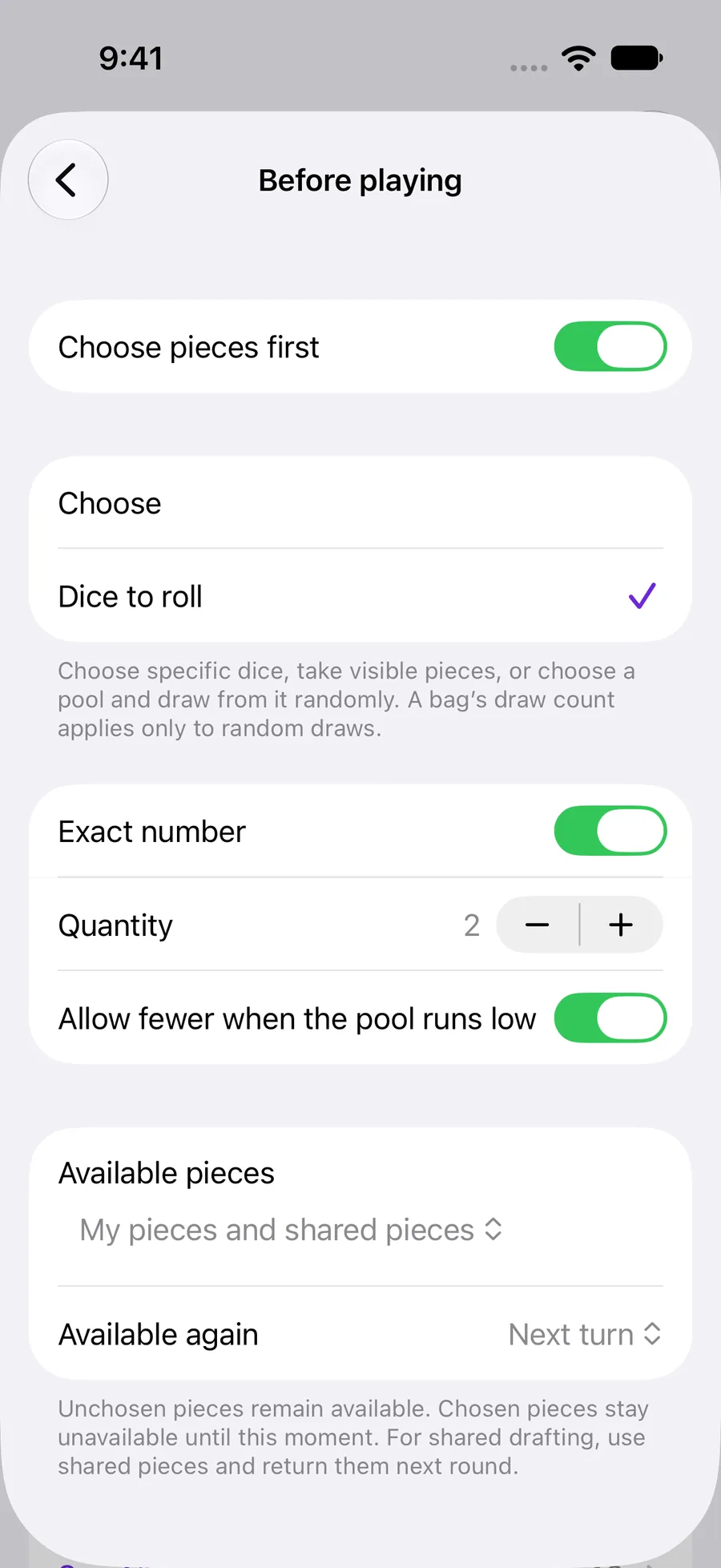
In the set editor, open How to play → Before playing and enable Choose pieces first. You can use selection with Free play; a turn sequence and other game changes are optional.
Select Dice to roll, turn on Exact number and set Quantity to 2. To allow a range instead, turn Exact number off and set Minimum and Maximum.
 Enlarge screenshot ↗︎
Example 1: choose two of five each turn
Keep all five dice shared in Pieces. In Before playing, choose My pieces and shared pieces and Available again → Next turn. Each player can choose any two of the five at the start of their turn.
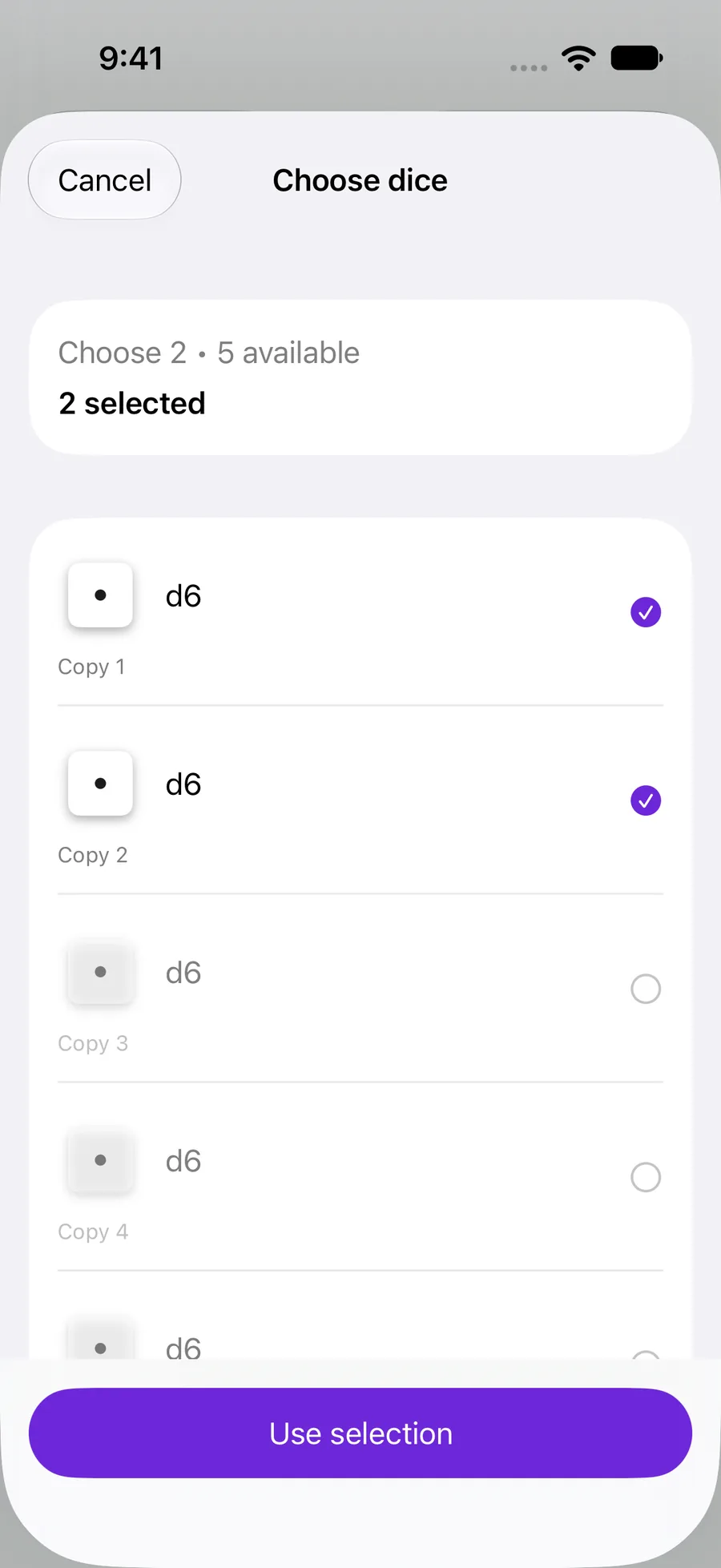
Start a new game, open Choose pieces, tap two dice and confirm with Use selection. Roll becomes available once the choice and the table are ready. Only those two dice roll; the other three stay out of the action.
Advance to the next turn. All five dice are available again, including the two just rolled.
 Enlarge screenshot ↗︎
Choose tokens, or choose a random pool
A bag’s Before playing offers two different token choices. The quantity here counts the copies the player selects.
- Visible pieces to take: choose the exact tokens to take. Selecting two takes those two copies, without a random draw.
- Pieces available for a random draw: choose which copies may be drawn, then draw randomly from that group. For example, choose four copies and set the bag’s Draw count to 1 to draw one of those four.
- For random draws, the bag’s draw count and return setting still apply. Available again determines when the selected group becomes available to choose again.
- In a set with loose dice and tokens, the other kind of component still plays normally. Dice bags separate extraction from rolling; follow the dice bag guide for that flow.
Decide when the choice is available again
Available again controls the temporary hold on chosen pieces. It does not buy, activate or transfer them. Use Changes during play → All settings when the game needs those inventory changes.
- After use: release the chosen pieces after the action.
- Next turn: restore them when the turn advances. Use this for two of five on every turn.
- Next round: hold them through the round so other players use the remainder.
- When reset manually: hold them until Return chosen pieces is used from the game menu. In a shared session, this is a host action.
Combine the choice with a turn program
Each step inherits the set’s Before playing settings. To change a particular step, open it and enable Before playing → Customize for this step. The choice is limited to the components included in that step.
During rerolls, the original choice stays fixed: players may keep or reroll chosen dice, but cannot swap in dice they left out. With no turn program, play the choice once, then advance the turn.
If a selected token pool runs out during a step, continue to the next step. If the whole available group runs out, advance the turn or round according to your return setting, or use the host’s manual return action.
YOUR TEST
Check it works.
Try both dice examples with two players. With Next turn, the second player should see all five. With Next round, the second player should see three. Then try Visible pieces to take and confirm that the exact selected copies are taken.
If something feels off
Why is Roll or Draw disabled?
Wait for the set to load and finish choosing the required number of pieces. Confirm with Use selection. In a shared session, check whose turn it is; also check that the current phase allows the action.
Why can I choose fewer pieces than the minimum?
Allow fewer when the pool runs low is on by default. Turn it off if your game requires the full count even when fewer pieces remain.
I changed the return setting, but the current game did not change.
A saved game keeps its starting configuration. Finish it and start a new game to try the edited set.
Can selection choose pieces from another player’s pile?
No. Personal pile ownership still applies. Use shared pieces for a common group that players take turns choosing from.